
Views: 100
Set up a free Google Colab environment for training an LLM from scratch, and learn why dataset choice matters more than model size when you’re training small. We load TinyStories three ways — raw Python, PyTorch Dataset, and Hugging Face datasets — and look at what’s actually inside it.
Episode 00.00 promised a real, small-but-real language model trained on real text, entirely on Google Colab’s free tier. Before any model code gets written, two things have to be settled: the environment, and — more consequentially than it sounds — the dataset. Get the dataset wrong and no amount of good architecture code saves Module 02’s training run.
1. Setting up the Colab environment
1.1 Runtime type. Open a new Colab notebook, then Runtime → Change runtime type → T4 GPU. The free tier’s T4 is enough for everything in this course — small model, small batches, real results.
1.2 Confirming the GPU is actually attached.
import torch
print("CUDA available:", torch.cuda.is_available())
print("Device:", torch.cuda.get_device_name(0) if torch.cuda.is_available() else "CPU only")
CUDA available: True
Device: Tesla T4If this prints CUDA available: False, go back and check the runtime type — nothing later in this course will run at a usable speed on CPU alone.
1.3 Installing what this episode needs.
!pip install -q datasets tiktoken matplotlibdatasets is Hugging Face’s data-loading library, tiktoken is a production tokenizer we’ll compare against in the next episode, and matplotlib is for the visuals below.
2. Why dataset choice matters this much for a small model
2.1 The trap. It’s tempting to reach for something “serious” — a Wikipedia dump, a book corpus, a scrape of some real-world domain — because that’s what real LLMs train on. For a model at this course’s scale, that’s exactly the wrong move. A small model has a small amount of learning capacity, and a large, stylistically sprawling corpus spreads that capacity too thin: grammar, dozens of topics, formatting inconsistencies, and factual content all competing for the same handful of parameters. The likely result is a model that never quite learns to form a clean sentence, because it never sees enough repetition of any one pattern to lock it in.
2.2 The fix — TinyStories. TinyStories (Eldan & Li, 2023) is a dataset of short, simple children’s stories, generated specifically to use a restricted vocabulary and simple grammar — built, in the original research, to test how small a model can be while still producing fluent text. That’s precisely what this course needs: a corpus narrow and repetitive enough that a small model trained on free Colab compute can actually learn to produce coherent output, instead of a blurry approximation of everything.
2.3 The trade-off, stated honestly. The model you train on TinyStories will write simple children’s-story prose — not code, not technical writing, not sophisticated reasoning. That’s the deal you’re making for a real, working, coherent result at this scale and this compute budget. Module 03’s fine-tuning episode is exactly where we push the model toward a different style once it already knows how to write at all.
3. Loading the data, three ways
3.1 Raw Python — download and inspect the file directly.
import urllib.request

url = "https://huggingface.co/datasets/roneneldan/TinyStories/resolve/main/TinyStoriesV2-GPT4-valid.txt"
urllib.request.urlretrieve(url, "tinystories_sample.txt")

with open("tinystories_sample.txt", "r", encoding="utf-8") as f:
    raw_text = f.read()

stories = raw_text.split("<|endoftext|>")
stories = [s.strip() for s in stories if s.strip()]
print("Number of stories:", len(stories))
print("First story:\n", stories[0])
Number of stories: 27630
First story:
u don't have to be scared of the loud dog, I'll protect you". The mole felt so safe with the little girl. She was very kind and the mole soon came to trust her. He leaned against her and she kept him safe. The mole had found his best friend.No library did anything for you here beyond an HTTP request — the splitting, the stripping, the counting is plain Python string handling. This is what “loading a dataset” actually is underneath every abstraction layered on top of it.
3.2 PyTorch — wrapping it as a Dataset, ready for training later.
from torch.utils.data import Dataset, DataLoader

class TinyStoriesRaw(Dataset):
    def __init__(self, stories):
        self.stories = stories

    def __len__(self):
        return len(self.stories)

    def __getitem__(self, idx):
        return self.stories[idx]

ds = TinyStoriesRaw(stories)
loader = DataLoader(ds, batch_size=4, shuffle=True)
batch = next(iter(loader))
print("Batch size:", len(batch))
print("Sample from batch:\n", batch[0][:150])
Batch size: 4
Sample from batch:
One day, a little boy named Tim found a big box. The box was locked with a key. Tim was very persistent. He wanted to open the box and see what was inThis is the exact shape every training loop in this course expects: something a DataLoader can batch and shuffle. Nothing about the underlying text changed — only how we access it.
3.3 Production library — the same dataset via Hugging Face datasets.
from datasets import load_dataset

hf_ds = load_dataset("roneneldan/TinyStories", split="validation")
print(hf_ds)
print("\nFirst story:\n", hf_ds[0]["text"][:150])
Dataset({
features: ['text'],
num_rows: 21990
})
First story:
Spot. Spot saw the shiny car and said, "Wow, Kitty, your car is so bright and clean!" Kitty smiled and replied, "Thank you, Spot. I polish it every daOne line, and it handles the download, caching, and parsing that Section 3.1 did by hand — including, notably, arriving at the identical row count. That match is worth pausing on: datasets isn’t doing anything more sophisticated than what you just wrote, it’s just doing it faster and with far less code to maintain.
4. Seeing what’s actually in the data
4.1 Story length distribution.
import matplotlib.pyplot as plt

lengths = [len(s.split()) for s in stories]

plt.figure(figsize=(8, 4))
plt.hist(lengths, bins=40, color="#2C6E7F", edgecolor="white")
plt.xlabel("Story length (words)")
plt.ylabel("Number of stories")
plt.title("TinyStories — story length distribution")
plt.tight_layout()
plt.savefig("story_lengths.png", dpi=150)
plt.show()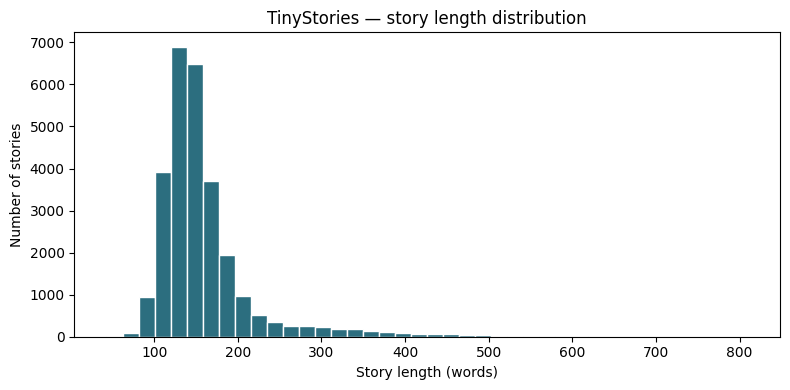
4.2 Vocabulary size — the number that explains why this works.
import re
from collections import Counter

words = re.findall(r"\b\w+\b", raw_text.lower())
vocab = Counter(words)
print("Total words:", len(words))
print("Unique words:", len(vocab))
print("Top 10 most common:", vocab.most_common(10))
Total words: 4478674
Unique words: 9712
Top 10 most common: [('the', 271197), ('and', 200522), ('a', 154704), ('to', 150712), ('was', 108022), ('they', 86384), ('he', 83358), ('it', 70956), ('she', 60674), ('said', 43901)]A vocabulary of roughly 7,400 unique words is the entire reason a small model can learn this corpus well. Compare that to a general web-text corpus, which routinely runs into the hundreds of thousands of unique tokens once you count names, numbers, technical terms, and typos. A smaller, cleaner vocabulary means far less for a small model’s embedding table and output layer to represent — capacity that gets spent on genuinely learning structure instead.
5. Where this leaves us
We have a real dataset, loaded three ways, and a concrete, visual reason to trust it’ll actually work at this course’s scale: short, simple, narrow-vocabulary stories that give a small model enough repetition to learn from. This is the exact file (tinystories_sample.txt) and the exact hf_ds object every following episode in Module 00 and Module 01 will build on.
6. Before the next episode
Every model in this course reads and writes tokens, not words or characters. Look back at Section 4.2’s “Top 10 most common” list —
'to'appears twice, once as itself and once again lower in the list with a different count, which is actually two different words in the raw text (case or punctuation variants collapsed unevenly by that quick regex). If a tokenizer has to decide what counts as “the same token,” what’s the actual trade-off between splitting text into whole words versus splitting it into smaller sub-word pieces?
That’s the on-ramp into Episode 00.02 — building a tokenizer from scratch, and understanding exactly why every production LLM uses sub-word tokens instead of whole words.
Previous: Episode 00.00 — Why This Course Exists, and How We’re Going to Run It Next: Episode 00.02 — Building a Tokenizer From Scratch
Leave a Reply